> For the complete documentation index, see [llms.txt](https://docs.algo724.com/llms.txt). Markdown versions of documentation pages are available by appending `.md` to page URLs; this page is available as [Markdown](https://docs.algo724.com/lens-uniswap-lp-tracker.md).
# Lens: Uniswap LP Tracker
## 🦄 Lens: Mastering Your Uniswap V3/V4 Positions
Welcome to Lens, our powerful tool for tracking, analyzing, and managing your Uniswap V3 and V4 concentrated liquidity positions. Whether you're a seasoned liquidity provider or just getting started, Lens gives you the data-driven insights you need to optimize your strategy.
***
### Part 1: Getting Started
When you first navigate to Lens, you have two primary ways to begin tracking positions.
* **Track Any Address**: For research and analysis. Simply enter any public wallet address or ENS domain (like `vitalik.eth`) to view its Uniswap LP positions anonymously.
* **Connect Your Wallet**: The full-featured experience. Connect your wallet via MetaMask, WalletConnect, or other supported methods. This not only lets you track your positions but also actively manage them directly from the Lens interface.
***
### Part 2: The Position List Dashboard
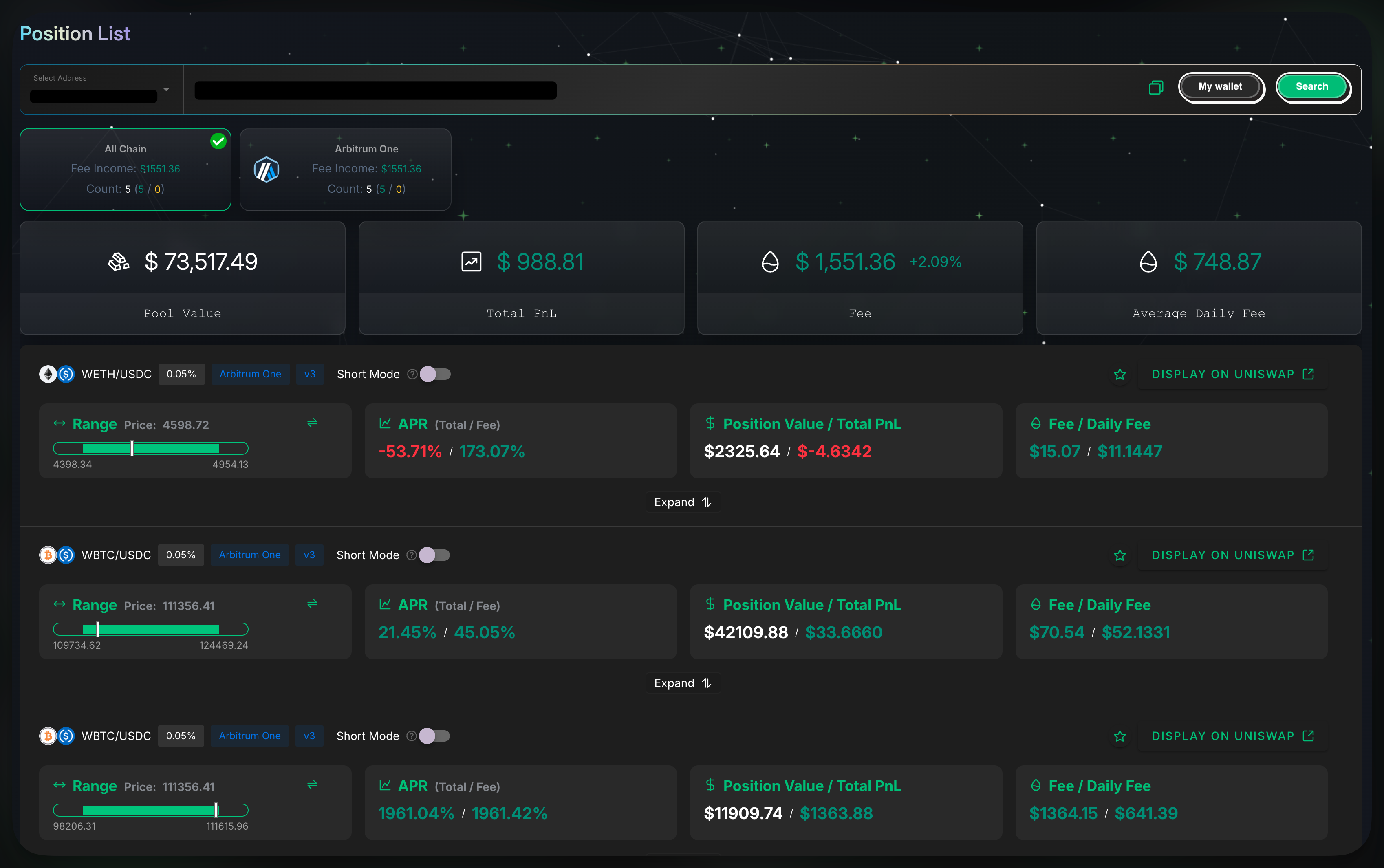
After connecting or entering an address, you'll see the main dashboard. This is your high-level overview of all the LP positions associated with the wallet.
* **Summary Bar**: At the top, you get key aggregated stats for the entire wallet:
* **Pool Value**: The total current value of all LP positions.
* **Total PnL**: The total profit and loss, including fees and impermanent loss.
* **Fee**: The total amount of fees generated.
* **Average Daily Fee**: The estimated average of fees earned per day.
* **Chain Filter**: Use the filter buttons (e.g., `All Chain`, `Arbitrum One`) to view positions on specific blockchain networks.
* **Position Cards**: Each card is a snapshot of an individual LP position, showing its `Range`, `APR`, `Position Value`, `PnL`, and `Fees`. From the card, you can also:
* ⭐ **Favorite** a position by clicking the star icon.
* ↗️ Jump directly to the pool on Uniswap by clicking **"Display on Uniswap"**.
***
### Part 3: Deep Dive - Analyzing a Single Position
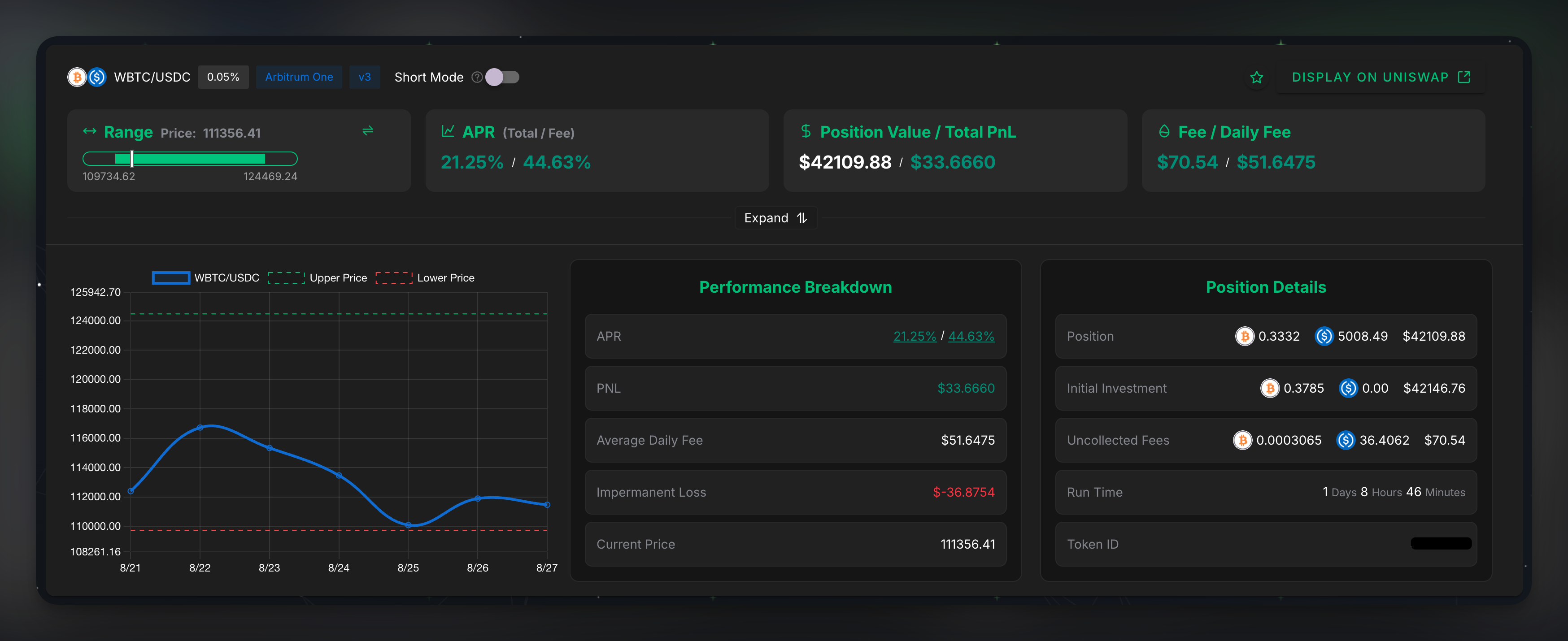
To get a detailed analysis, click **"Expand"** on any position card.
This view is broken down into key sections:
**Performance Chart**
This graph shows the asset's price history relative to your position's **Upper Price** and **Lower Price**, helping you visualize if your position is in range and actively earning fees.
**Performance Breakdown**
* **APR**: The Annual Percentage Rate, projecting the annualized return based on recent fee generation.
* **PNL**: The total Profit and Loss of the position to date.
* **Average Daily Fee**: The average amount of fees this specific position has earned per day.
* **Impermanent Loss**: A key metric for LPs. It measures the difference in value between holding your assets in the pool versus simply holding them in your wallet. Lens calculates this for you automatically.
**Position Details**
* **Position**: The current amount and value of the two assets in your position.
* **Initial Investment**: The value of the assets at the moment you created the position.
* **Uncollected Fees**: Fees that your position has earned and are available for you to claim.
* **Run Time**: The total time the position has been active.
***
### Part 4: Advanced Features
Lens also includes powerful features for advanced users and active managers.
#### **Managing Your Positions**
If you have connected your own wallet, you will see management options directly within the detailed view. This allows you to:
* **Add/Remove Liquidity**: Adjust your position size without leaving the dashboard.
* **Collect Fees**: Claim your uncollected fees with a single click.
#### **Short Mode**
This unique analytical tool allows you to evaluate your position's performance from a different perspective.
* **How it works**: By toggling on **"Short Mode,"** the PnL and other metrics are recalculated as if your initial assets were **borrowed**. This is a powerful feature for advanced strategies, helping you understand the performance of a delta-neutral or hedged liquidity position.